What is the account-level visitor identification app?
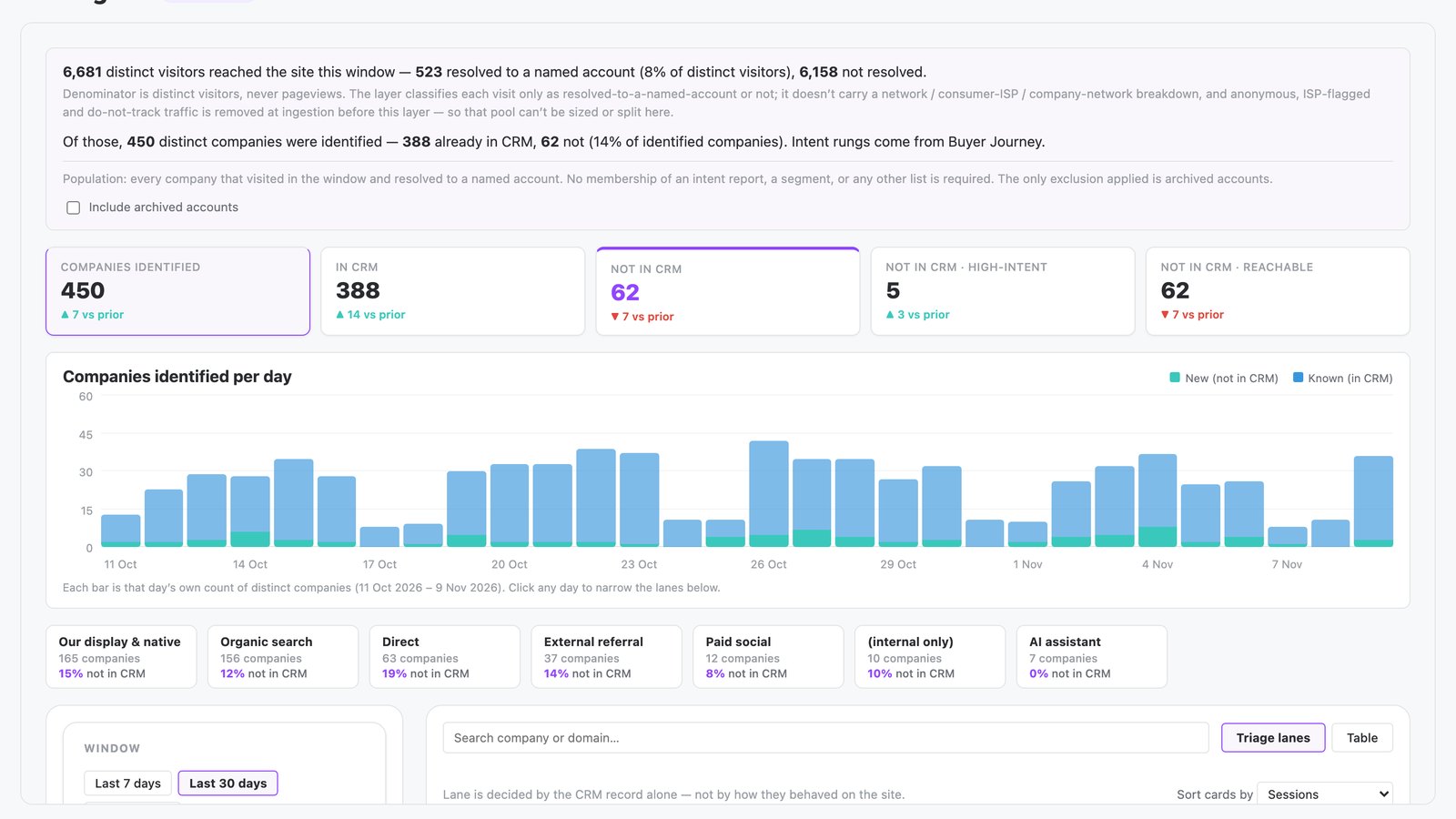
The account-level visitor identification app is built in N.Rich AI and identifies the companies visiting your website. It shows which of those companies are in your CRM and which are not. It highlights new accounts to push to sales today.
It opens free in the N.Rich AI playground on demo data. On your own N.Rich account, it reads accounts and deals from HubSpot or Salesforce.
- Account identification and triage Website traffic resolves to named companies, triaged by CRM status and intent signal.
- Daily visit trends Daily visits split between known accounts and new accounts.
- Account deep-dive Website behavior, intent topics, ad engagement and CRM opportunities for each account.
- Built for
- Marketing, Sales
- Category
- Intent
- Reads from
- N.Rich and your CRM (HubSpot or Salesforce)
- In the playground
- Site Signal
- Cost
- Free on demo data. No credit card.
What questions does the account-level visitor identification app answer?
What is account-level website visitor identification?
Account-level website visitor identification matches anonymous site traffic to the company behind it. A team sees which accounts visit its site and which pages they read. That turns anonymous traffic into accounts marketing can act on. The account-level visitor identification app resolves visits to named accounts, then checks each one against your CRM.
In the app: The whole appHow can I identify B2B buyers before they fill out a form?
Identify the companies behind your website traffic. Many B2B buyers research for weeks without filling out a form, but their company still shows interest through the pages it reads. Naming those companies lets marketing push them to sales early. The account-level visitor identification app resolves visits to named accounts and shows the pages each account visited.
In the app: Detail panelHow do I find companies visiting my website that aren't in my CRM?
Match your website traffic to the companies behind it, then check each one against your CRM. A company with no CRM record is a new account that already shows interest, and nobody owns it yet. The account-level visitor identification app does both steps and lists these companies in its New/unowned lane, with the change from the prior period.
In the app: New/unowned laneWhich visiting companies should marketing push to sales first?
Start with companies that are new to your CRM, show high intent and can be reached. Interest from an account nobody owns yet is the clearest case for a sales handoff. The account-level visitor identification app counts these accounts in its Not in CRM high-intent and Not in CRM reachable tiles. Every account also shows its third-party intent.
In the app: Not in CRM high-intent and Not in CRM reachable tilesHow do I avoid passing sales an account that is already in a deal?
Check each visiting company against open opportunities in your CRM before you hand it over. A visit from an account already in a deal belongs with its current owner. The account-level visitor identification app puts these companies in its In-play lane, and the detail panel lists their open opportunities next to their page visits.
In the app: In-play laneWhat should I look for in website visitor identification software for ABM?
Look for identification at company level that connects to your CRM and your ABM data. A list of visiting companies only helps when you can see which are new, which are in a deal and how much intent each shows. The account-level visitor identification app checks every company against HubSpot or Salesforce and adds third-party intent and ad engagement.
In the app: The whole app
What data does the account-level visitor identification app use?
From N.Rich
| Source | What the app reads | Where you see it |
|---|---|---|
| Website visits | First-party traffic resolved to named companies, at account level, plus page visits and arrival source | Companies identified tile and daily visit trends; page visits in the detail panel |
| N.Rich intent | Intent level and intent topics for each account | Intent level on each account; intent topics in the detail panel |
| N.Rich advertising | Campaign interactions for each account | Ad engagement on each account; campaign interactions in the detail panel |
From your CRM HubSpot or Salesforce
| Source | What the app reads | Where you see it |
|---|---|---|
| CRM accounts | Whether a company has a CRM record, and its ICP membership | In CRM and Not in CRM tiles; ICP membership on each account |
| CRM deals | Open opportunities for each account | In-play lane and the detail panel |
In the playground, every source holds demo data.
How does it work?
- The app resolves first-party website traffic to named accounts.
- It sorts each account into one of three lanes using CRM records only. The lanes are new and unowned, known with no open opportunities, and in play with open opportunities.
- Each account shows its third-party intent level, ad engagement, reachability and ICP membership.
- You filter by intent level, ad engagement, region, arrival source and custom segments. A detail panel shows page visits, intent topics, ad interactions and open opportunities.
Make it yours
Type a request and N.Rich AI rebuilds the app. Teams often start with one of these.
- Show only companies that are not in our CRM
- Filter to high-intent accounts in one region
- Split the visits by arrival source
- Show only companies that engaged with our ads
Before you start
Is it free?
Yes. Every app runs free in the N.Rich AI playground on demo data. You do not need a credit card.
Do I need my own data?
No. The playground runs on a demo dataset, so you can try the app before you connect your own data.
Which CRMs does it work with?
On your own N.Rich account, apps read accounts and deals from HubSpot or Salesforce.
Can I change it?
Yes. Ask N.Rich AI to add a column, change a filter or focus on one segment, and it rebuilds the app.