What is the hot accounts app?
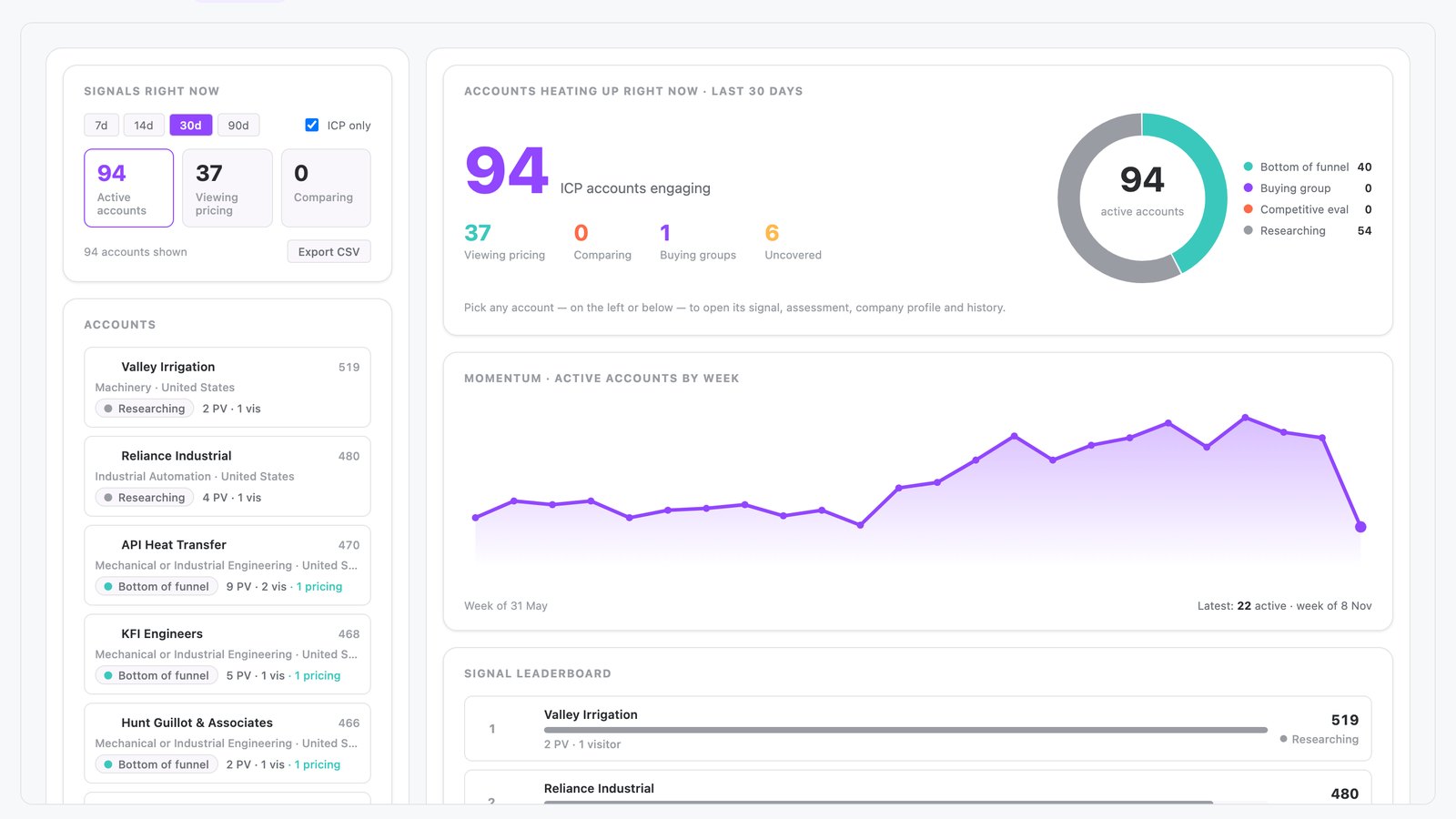
The hot accounts app is built in N.Rich AI and shows which ICP accounts are hot and exactly why. It ranks them by ad engagement, website visits and third-party intent. Each account opens into a full signal breakdown.
It opens free in the N.Rich AI playground on demo data. On your own N.Rich account, it reads accounts and deals from HubSpot or Salesforce.
- First-party engagement scoring Your ads and your website feed each account's score: ad engagement, pricing visits, comparison views and buying group activity.
- A ranked hot account list Accounts ranked by signal strength, with engagement metrics and sales coverage status.
- The journey behind each account Signal breakdown, ad and website engagement, CRM status, firmographics and sales activity for each account.
- Built for
- Marketing, Sales
- Category
- Intent
- Reads from
- N.Rich and your CRM (HubSpot or Salesforce)
- In the playground
- Hot Accounts
- Cost
- Free on demo data. No credit card.
What questions does the hot accounts app answer?
What is a hot account?
A hot account is an account showing strong, recent buying signals. In N.Rich, three inputs set the hot level: engagement with your ABM ads, visits to your website and third-party intent. The first two are first-party data. An ad engagement is a 20-second video view, half an article read or an ad click. The hot accounts app ranks these accounts.
In the app: The whole appWhy does sales ignore ABM intent alerts and how do I fix it?
Sales ignores intent alerts when it cannot see why an account was flagged. Show the evidence: the ads the account engaged with, the pages it visited and the third-party intent behind it. When sales can check the evidence, it trusts the list marketing hands over. The hot accounts app shows which ICP accounts are hot and exactly why.
In the app: Account viewHow can I find which target accounts are clicking my ads and visiting my website?
Combine ad engagement and website visits for each target account in one view, then rank the accounts by that activity. In ABM, ads and site visits show which accounts respond to your outreach. The hot accounts app ranks ICP accounts by ad and website engagement. Open an account to trace each signal back to its ad and see how it moved the account toward hot.
In the app: Account list and ICP only toggleHow can I tell which target accounts are comparing us with other vendors or viewing our pricing?
Watch for target accounts that view your comparison pages or your pricing page, because they are weighing vendors. Catching an account at this stage lets sales step in while it is still evaluating. The hot accounts app flags target accounts in your ABM program that view comparison pages, with Comparing and Viewing pricing tiles and filters.
In the app: Comparing and Viewing pricing tilesHow do I know whether sales has already covered our hottest accounts?
Check each hot account against the sales activity logged for it. An untouched hot account is a missed opportunity. Marketing and sales then work from one list with the same evidence. The hot accounts app shows sales coverage status next to each hot account. Sales sees which hot accounts nobody has touched yet, and marketing sees that the accounts it warmed up reach a rep.
In the app: Sales coverage status in the account listWhat should I look for in an ABM tool with explainable account scoring?
Look for scoring that shows its evidence. It should combine ad engagement, website visits and third-party intent, and let you open any account to see the signals behind its score. In ABM, marketing and sales need the same facts to agree on priorities. The hot accounts app opens each account into a full signal breakdown.
In the app: Account view
What data does the hot accounts app use?
From N.Rich
| Source | What the app reads | Where you see it |
|---|---|---|
| Website visits | Page views, visitor counts, pricing views, key pages and where visits come from | Page views, visitor counts and pricing views in the account list; key pages and where visits come from in the account view |
| N.Rich advertising | Ad engagement and campaign reach for each account | Campaign reach in the account view |
| N.Rich intent | Intent signals, including research engagement | Score in the account list |
From your CRM HubSpot or Salesforce
| Source | What the app reads | Where you see it |
|---|---|---|
| CRM accounts | Funnel stage, firmographics and pipeline status | Funnel stage in the account list; CRM status and firmographics in the account view |
| Sales activity | Sales touches and coverage status | Sales coverage status in the account list |
In the playground, every source holds demo data.
How does it work?
- The app reads website visits, ad engagement, intent signals and sales touches over a time window of 7 to 90 days.
- It scores each ICP account on engagement depth, such as pricing page visits, several visitors and comparison views.
- It ranks accounts by signal strength. You filter by active, pricing, comparing or buying group, and you can export the results.
- You open an account to see visitor locations, key pages, CRM pipeline status, campaign reach and engagement trends. A chat panel answers tactical questions about that account.
Make it yours
Type a request and N.Rich AI rebuilds the app. Teams often start with one of these.
- Show only accounts that viewed pricing
- Change the time window to 14 days
- Hide accounts that sales already touched
- Show only accounts with an active buying group
Before you start
Is it free?
Yes. Every app runs free in the N.Rich AI playground on demo data. You do not need a credit card.
Do I need my own data?
No. The playground runs on a demo dataset, so you can try the app before you connect your own data.
Which CRMs does it work with?
On your own N.Rich account, apps read accounts and deals from HubSpot or Salesforce.
Can I change it?
Yes. Ask N.Rich AI to add a column, change a filter or focus on one segment, and it rebuilds the app.