




Ready to become an N.Rich AI builder and get paid for it?

Find out more

Integrations

N.Rich ABM advertising with Salesforce

N.Rich is an ABM platform with a native Salesforce integration that has passed the Salesforce security review. Build your target account list in Salesforce reports, and N.Rich keeps it in sync. Then see the impact of every campaign through first-party engagement on each Salesforce account, so you can trust the numbers.

Last updated

4.7 115 reviews Source: G2.com, Inc.
Salesforce
JC
SalesHomeAccounts Contacts Opportunities Reports
AccountHalden Freight
FollowNew ContactNew Case
RelatedDetailsNews
N.Rich intent data
Composite intent score94
High intent topics4
Intent topic 1Predictive maintenance
N.Rich analytics linkOpen in N.Rich
N.Rich ABM engagements
Total ABM engagement133
Total video views118
Last ABM engagement date06/11/2026
LinkedIn clicks for last 30 days12
ICP sales velocityHigh
Contacts with ABM engagement7
ActivityChatter
EmailNew Task
Upcoming & Overdue
Discovery call follow-up12 Nov
Send fleet data checklist14 Nov
November · 2026
Intro callMaya Brooks had a meeting
Re: fleet uptimeMaya Brooks sent an email
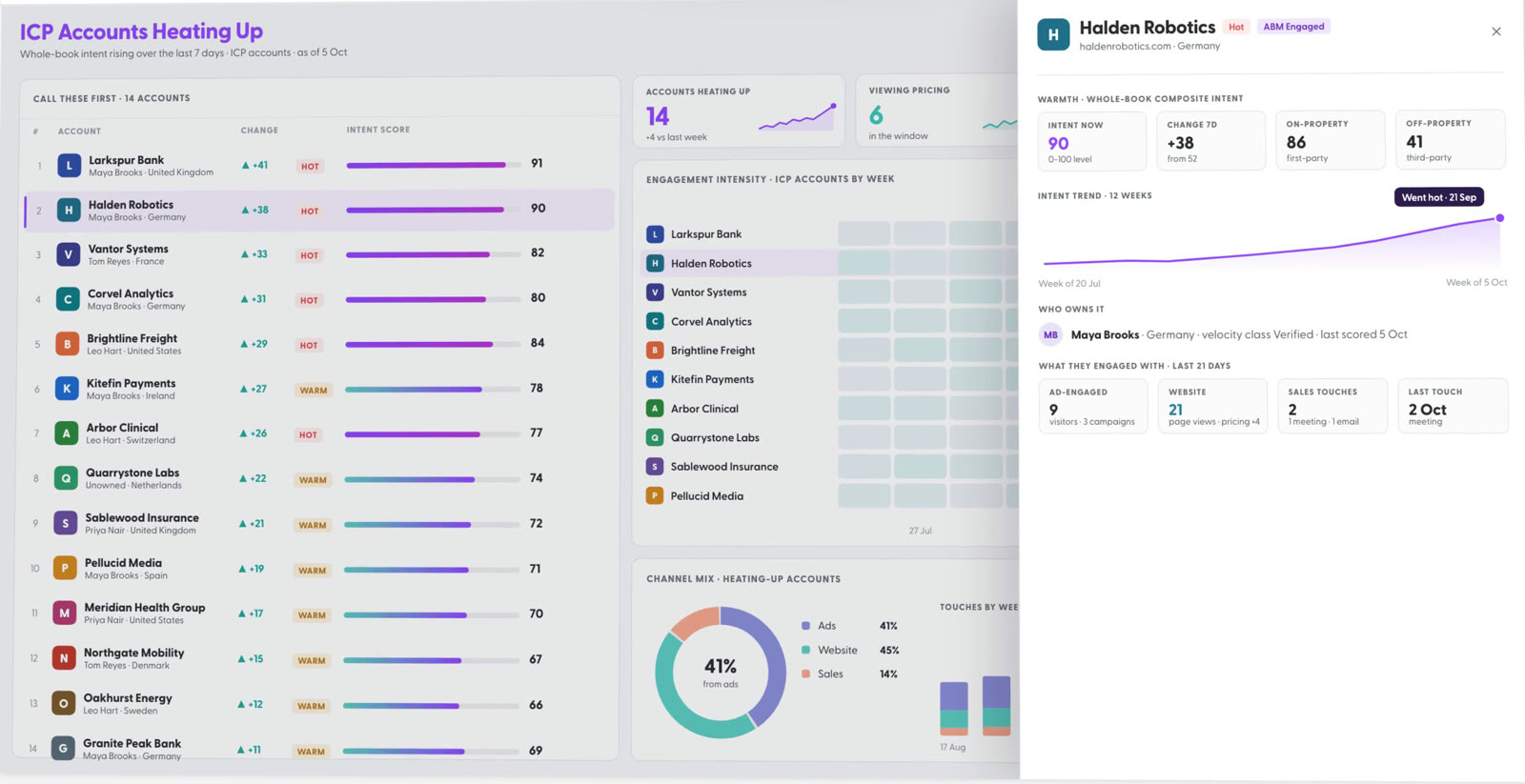
Hot ICP Accounts
An N.Rich AI app open over a Salesforce account record, showing ICP accounts heating up
TRUSTED BY GROWTH LEADERS WHO INVEST IN OUTCOMES
Mouseflow
EHS Insight
Trapets
QAD
GE HealthCare
TRUMPF
Veeva Systems
LexisNexis
Staffbase
Docebo
Wärtsilä
JetBrains
Lime Technologies
GlobalSign
Winningtemp

How the Salesforce integration works

Connect Salesforce once, in N.Rich settings, with a dedicated Salesforce user. N.Rich matches accounts by the Website field and by the email domains of each account's contacts. The data then stays in sync between the two platforms. Reports and opportunities come into N.Rich, where they shape your segments, ABM ads and pipeline reports. When a report changes, your segment changes with it, so your budget stays on the accounts that matter. Intent and engagement go back onto the Account object as fields you create first. Any app you build in N.Rich AI can go there too, so each account record carries that context.

Use it to

  • Run ABM ads to a Salesforce report. N.Rich turns the report into a segment and keeps it in sync, so as the report changes, your budget follows the accounts that matter.
  • Rank accounts by intent in Salesforce. Intent scores and topics sit on each account, so reps can sort dashboards by who is in market.
  • Prove which opportunities ABM influenced. ABM engagement sits on the account, so you can report pipeline influence in Salesforce.
  • Give reps account context in Salesforce. Publish N.Rich AI apps to Salesforce, and reps open them from the account record they are already on.

You need

  • A dedicated user with a full Salesforce licence
  • The six N.Rich IP addresses set as trusted
  • The N.Rich fields created in Salesforce

What moves between the two

Your CRM decides who to target. N.Rich runs the ABM programme. Salesforce gets the results back on the account.

Reads
Salesforce Reports Opportunities Account domains N.Rich
Inside N.RichSegmentsIntent reportsAd engagementAccount analytics
Writes back
N.Rich 34 account fields Segment membership Salesforce

What N.Rich reads

Reports become segments. Opportunities power pipeline analytics and your ICP.

What happens in N.Rich

N.Rich runs ABM ads to those accounts in four formats and tracks engagement per account.

What N.Rich writes back

Intent, engagement and ICP velocity land on every account, ready for reports.

Salesforce integration at a glance

QuestionAnswer
What N.Rich reads Accounts, opportunities, contacts, tasks, events and tabular account reports
What N.Rich writes 34 fields on the Account object in five groups, plus segment membership on a custom object
Can reps see N.Rich AI apps in Salesforce Yes. Publish an N.Rich AI app to your CRM, and reps open it from the Salesforce account record.
Who creates the fields You do, before you connect. N.Rich does not create fields in Salesforce.
Does it create accounts No. Account creation is available for HubSpot only.
How records match By the domain in the Website field and the email domains of the account's contacts
How often it syncs Every 4 to 8 hours
Salesforce access needed A dedicated user with a full licence. Write on Account. Read on Contact, Opportunity, Task, Event and Report.
Security Passed the official Salesforce security review. Six N.Rich IP addresses go on your trusted list.

Source: N.Rich knowledge base. Checked 8 November 2026.

What ABM teams do with it

The integration turns your CRM into the starting point and the scoreboard of every ABM programme.

Kelvra's ads, shown to Halden Freight

Article ad: you pay when half the article is read.

Impressions1,284Free
Intent score94Up from 58

Close the loop between your report and your ads

Build the report once in Salesforce, and N.Rich keeps the segment in sync. Disqualify an account centrally, and you stop paying to reach it. N.Rich writes engagement and intent back to the account as fields. You see exactly what your ads did and how each account engaged, not a black box score.

Halden RoboticsAccount in Salesforce
N.Rich4 apps
Hot ICP AccountsRanks heating-up ICP accounts by engagement across ads, website and sales.
Open
Weekly pipeline pulsePipeline KPIs, major deal movements and account engagement, week over week.
Open
Account progressionAccounts moving between funnel stages, and what moved them.
Open
Churn risk radarFlags customer accounts whose engagement is falling ahead of renewal.
Open

Take your insight to where sales already works

Getting sales to log in to another platform is hard, and shared spreadsheets go stale. Build any view you need in N.Rich AI and publish it to Salesforce as an app. Reps open it from the account record they are working on, and the app brings in that account's context.

DashboardRefresh
Top accounts by N.Rich intentView report
Halden Freight94
Larkspur Bank91
Vantor Systems79
Corvel Analytics76
Orrin Analytics72
Brightmoor Health68
Sum of nrich_CompositeIntentScore by Account Name

Show sales which accounts are warm, and why

Build Salesforce reports and dashboards on the N.Rich fields. Reps see which accounts are warm, which ads they engaged with and what they have been researching.

OverviewLocationsWebsiteIntentOpportunitiesAds
Engaged users7Engaged with ads or website
Article ad readers4Scrolled 50% or more
Video ad views118Viewed 20s or more
Total website visits14Visits
Total engagementsLinkedIn clicksSales engagementsTotal engagementsWebsite visits
0255075100Wed 14Sat 17Tue 20Fri 23Mon 26Thu 29Sun 1

One set of numbers the whole business trusts

N.Rich combines ABM ads, website visits, LinkedIn clicks and Salesforce opportunities for each account. Marketing and sales work from the same first-party numbers, so everyone can get behind them.

Account · Halden Freight
N.Rich Account Segments (3)New
N.Rich Segment NameN.Rich Segment IDAccount
In-market tier 121412Halden Freight
Q4 tier 1 accounts21388Halden Freight
Logistics ICP EMEA20977Halden Freight
View All
Custom object: nrich_AccountSegment__c

See segment membership on the account

A custom object lists every N.Rich segment an account belongs to, as a related list on the account.

The 34 fields N.Rich writes to Salesforce

Create these fields on the Account object with the exact names and types below before you connect, or the sync fails.

Intent data13 fields
Field nameLabelType
nrich_IntentReportNameIntent report nameText (255)
nrich_CompositeIntentScoreComposite intent scoreNumber
nrich_FirstPartyIntentScoreFirst party account intent scoreNumber
nrich_ThirdPartyIntentScoreThird party intent scoreNumber
nrich_HighIntentTopicsNumHigh intent topicsNumber
nrich_IntentTopicsListAll intent topicsLong Text Area
nrich_IntentTopic_1Intent topic 1Text (255)
nrich_IntentTopic_2Intent topic 2Text (255)
nrich_IntentTopic_3Intent topic 3Text (255)
nrich_IntentLocation_1Intent location 1Text (255)
nrich_IntentLocation_2Intent location 2Text (255)
nrich_IntentLocation_3Intent location 3Text (255)
nrich_AnalyticsLinkN.Rich analytics linkText (255)
ABM engagements12 fields
Field nameLabelType
nrich_LastEngagementDateLast ABM engagement dateDate
nrich_LastClickDateLast ABM click dateDate
nrich_LastWebsiteVisitDateLast website visit dateDate
nrich_EngagedContactsContacts with ABM engagementNumber
nrich_AllTimeEngagedContactsAll time engaged cookiesNumber
nrich_ClickedContactsContacts with ABM clicksNumber
nrich_VisitedContactsContacts with website visitsNumber
nrich_TotalClicksTotal clicksNumber
nrich_TotalVideoViewsTotal video viewsNumber
nrich_TotalArticleReadersTotal article readersNumber
nrich_TotalEngagementsTotal ABM engagementNumber
nrich_AllTimeTotalEngagementsAll time ABM engagementNumber
Web engagements4 fields
Field nameLabelType
nrich_TotalWebsiteVisitsTotal website visitsNumber
nrich_TopWebsiteEngagementsTop 5 website engagementsLong Text Area
nrich_TopAdEngagementsTop 5 ad engagementsLong Text Area
nrich_TopCampaignEngagementsTop 5 campaign engagementsLong Text Area
ICP velocity2 fields
Field nameLabelType
nrich_IcpSalesVelocityClassICP sales velocityText (255)
nrich_IcpSalesVelocityScoreICP sales velocity scoreNumber
LinkedIn campaigns engagement3 fieldsPlus the custom object nrich_AccountSegment__c for segment membership
Field nameLabelType
nrich_LinkedinClicksLast7DaysLinkedIn clicks for last 7 daysNumber
nrich_LinkedinClicksLast30DaysLinkedIn clicks for last 30 daysNumber
nrich_LinkedinClicksLast90DaysLinkedIn clicks for last 90 daysNumber

Connect Salesforce in four steps

Do steps 1 to 3 in Salesforce first. Then connect from N.Rich.

  1. Setup · New User
    1

    Create a Salesforce user for N.Rich

    Use a dedicated user with a full licence. The Integration User licence does not work.

  2. Network Access · Trusted IP Range
    2

    Trust the N.Rich IP addresses

    Add the six addresses from the setup guide as trusted IP ranges.

  3. Object Manager · Account · New Field
    3

    Create the N.Rich fields

    Add the 34 fields with the exact names and types in the field list.

  4. ⚙ Settings
    ✓Website tag
    ✓Intent
    ✓CRM
    ✓LinkedIn integration
    CRM
    Automatically sync Salesforce CRM Data
    Pull opportunity data from CRM to N.Rich
    Push account engagement data
    SAVE
    4

    Connect from N.Rich

    Go to Settings, then CRM, choose Salesforce CRM, click Integrate and log in. Choose your settings and save.

What the integration does not do

  • It does not create fields

    You create the 34 fields in Salesforce before you connect.

  • It does not support sandboxes

    Connect a production Salesforce org.

  • It does not create accounts

    Account creation from segments is available for HubSpot only.

  • It does not install from AppExchange

    The app installs itself when you connect from N.Rich.

Salesforce integration FAQ

N.Rich has a native Salesforce integration that has passed the Salesforce security review. That matters because ABM breaks when marketing and sales work from different account lists. With N.Rich, you build the list as a Salesforce report and it stays in sync as a segment. N.Rich then writes intent and engagement to every account as 34 fields.

Sync the report into your ABM platform, so the audience changes when the report changes. A CSV upload goes stale and keeps spending on accounts you have already disqualified. In N.Rich, a Salesforce report becomes a segment that stays in sync. N.Rich runs ads to it in four formats, and you pay for engagements, not impressions.

Write account-level engagement to the Account object as fields that reps can sort and report on. If engagement stays in an ad platform, sales never sees it. N.Rich writes the composite intent score, intent topics, top ad engagements and website engagement to each account. A related list also shows every N.Rich segment the account belongs to.

Put the insight in the CRM record that reps already use. A separate dashboard rarely gets opened, and a shared spreadsheet goes out of date. In N.Rich AI, you build an app for any view you need and publish it to Salesforce. Reps open it from the account record, and it loads that account's context.

Connect account-level engagement to opportunities. Without that link, ABM looks like brand spend, and the budget is hard to defend. N.Rich reads Salesforce opportunities, and its progression analytics show which opportunities had ABM engagement. The N.Rich fields on each account let you build the same view in Salesforce reports and dashboards.

You need a dedicated user with a full Salesforce licence, because the Integration User licence cannot do the browser sign-in. Set the six N.Rich IP addresses as trusted ranges. Create the 34 N.Rich fields with the exact names and types from the field list. Then connect a production org, because sandboxes are not supported.

Rated by B2B marketers on G2
medal 4medalmedal 2medal 3

See your accounts in N.Rich

Book a demo and we will show the integration on your own Salesforce data.