What is the marketing channel performance app?
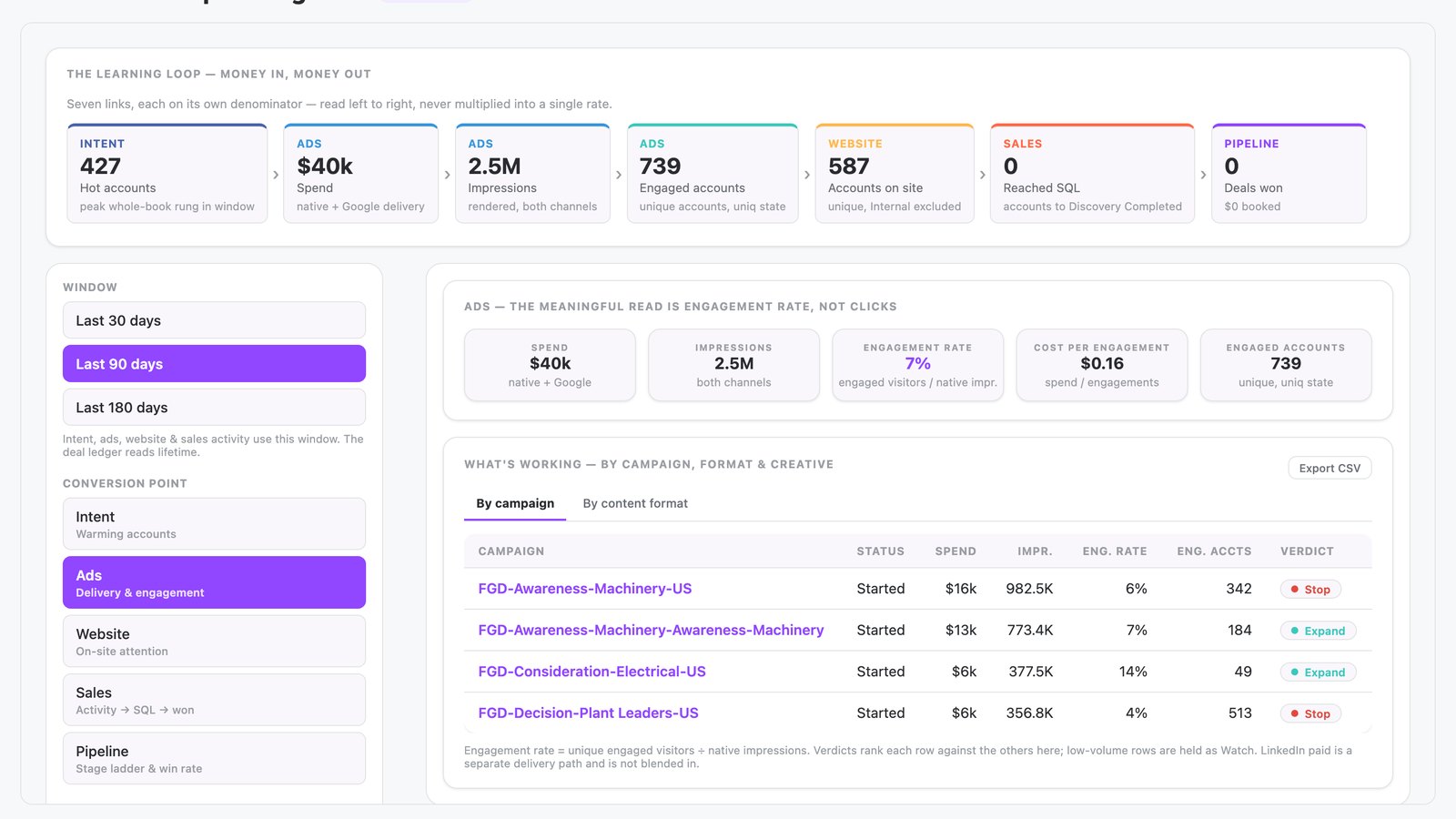
The marketing channel performance app is built in N.Rich AI and shows what works across intent, ads, website, sales and pipeline. It gives each campaign, creative, channel or rep a verdict of Expand, Optimize or Stop. A team uses it to decide where to focus next.
It opens free in the N.Rich AI playground on demo data. On your own N.Rich account, it reads accounts and deals from HubSpot or Salesforce.
- A conversion funnel Multiple stages, from intent through pipeline.
- Performance verdicts Expand, Optimize or Stop, ranked within peer sets.
- Drill-down detail Detail views on campaigns, creatives, channels and reps.
- Built for
- Marketing, RevOps, Leadership
- Category
- Reporting
- Reads from
- N.Rich and your CRM (HubSpot or Salesforce)
- In the playground
- Conversion Loop Intelligence
- Cost
- Free on demo data. No credit card.
What questions does the marketing channel performance app answer?
What is marketing channel performance?
Marketing channel performance measures how each channel, campaign and asset contributes from first intent to pipeline. Teams use it to decide what to stop, optimize or expand. Without it, budget decisions rest on guesses. The marketing channel performance app gives each campaign, creative, channel or rep a verdict of Expand, Optimize or Stop.
In the app: The whole appHow can I connect ad spend to CRM pipeline?
Follow each stage from ad spend and engagement through website activity and sales outreach to the pipeline stages in your CRM. Give each stage its own base, so a team can see where activity stops turning into the next stage. This ties spend to revenue outcomes. The marketing channel performance app chains intent, ads, website, sales and pipeline into one conversion loop.
What should I look for in a marketing channel performance dashboard?
Look for a dashboard that covers every stage from intent to pipeline, compares each channel with comparable channels and drops internal traffic from its numbers. It should give a clear next action for each row. A dashboard without verdicts leaves the decision to a meeting. The marketing channel performance app covers intent, ads, website, sales and pipeline and leaves internal traffic out of every metric.
How do I decide which campaigns to expand, optimize or stop?
Compare each campaign with its peers, such as other campaigns, and rank the results. Expand the leaders, fix the middle and stop the laggards. A peer comparison treats small and large campaigns fairly. The marketing channel performance app ranks each item against its own peers and gives it a verdict of Expand, Optimize or Stop.
Where does conversion break between intent and pipeline?
Measure the conversion from each stage to the next, starting with account intent and ending with pipeline. The stage where conversion falls shows where activity stops feeding the next step. Fixing that stage first helps the whole funnel. The marketing channel performance app shows KPIs and breakdown tables for each stage, with drill-downs to creatives, pages, channels and reps.
In the app: KPIs and breakdown tables for each stageHow can I avoid judging a campaign on too little data?
Set a minimum volume before you rank anything. A small sample can swing a result, so hold back the verdict until the campaign has more data. This protects ABM budgets from decisions based on noise. The marketing channel performance app marks rows with low volume as Watch. You can ask N.Rich AI to raise the minimum volume.
What data does the marketing channel performance app use?
From N.Rich
| Source | What the app reads | Where you see it |
|---|---|---|
| N.Rich intent | Account warmth | Intent stage |
| N.Rich advertising | Ad spend and engagement | Ads stage |
| Website visits | Time on site and page depth | Website stage |
From your CRM HubSpot or Salesforce
| Source | What the app reads | Where you see it |
|---|---|---|
| Sales activity | Outbound activity through to sales qualified leads | Sales stage |
| CRM deals | Pipeline stages and win rate | Pipeline stage |
In the playground, every source holds demo data.
How does it work?
- The app chains conversion points across intent, ads, website, sales and pipeline. Each point is measured against its own base.
- You pick a time window and a conversion stage. The app then shows KPIs and breakdown tables for that stage.
- It ranks each item against its own peers and gives it a verdict of Expand, Optimize or Stop. It marks low-volume rows as Watch, so small numbers do not mislead.
- You open a row to see which creatives, pages, channels and reps drive each stage. The app leaves internal traffic out of every metric.
Make it yours
Type a request and N.Rich AI rebuilds the app. Teams often start with one of these.
- Show only the last 30 days
- Show verdicts for ad creatives only
- Show the sales stage by rep
- Raise the minimum volume before a row gets a verdict
Before you start
Is it free?
Yes. Every app runs free in the N.Rich AI playground on demo data. You do not need a credit card.
Do I need my own data?
No. The playground runs on a demo dataset, so you can try the app before you connect your own data.
Which CRMs does it work with?
On your own N.Rich account, apps read accounts and deals from HubSpot or Salesforce.
Can I change it?
Yes. Ask N.Rich AI to add a column, change a filter or focus on one segment, and it rebuilds the app.