What is the buying committee coverage app?
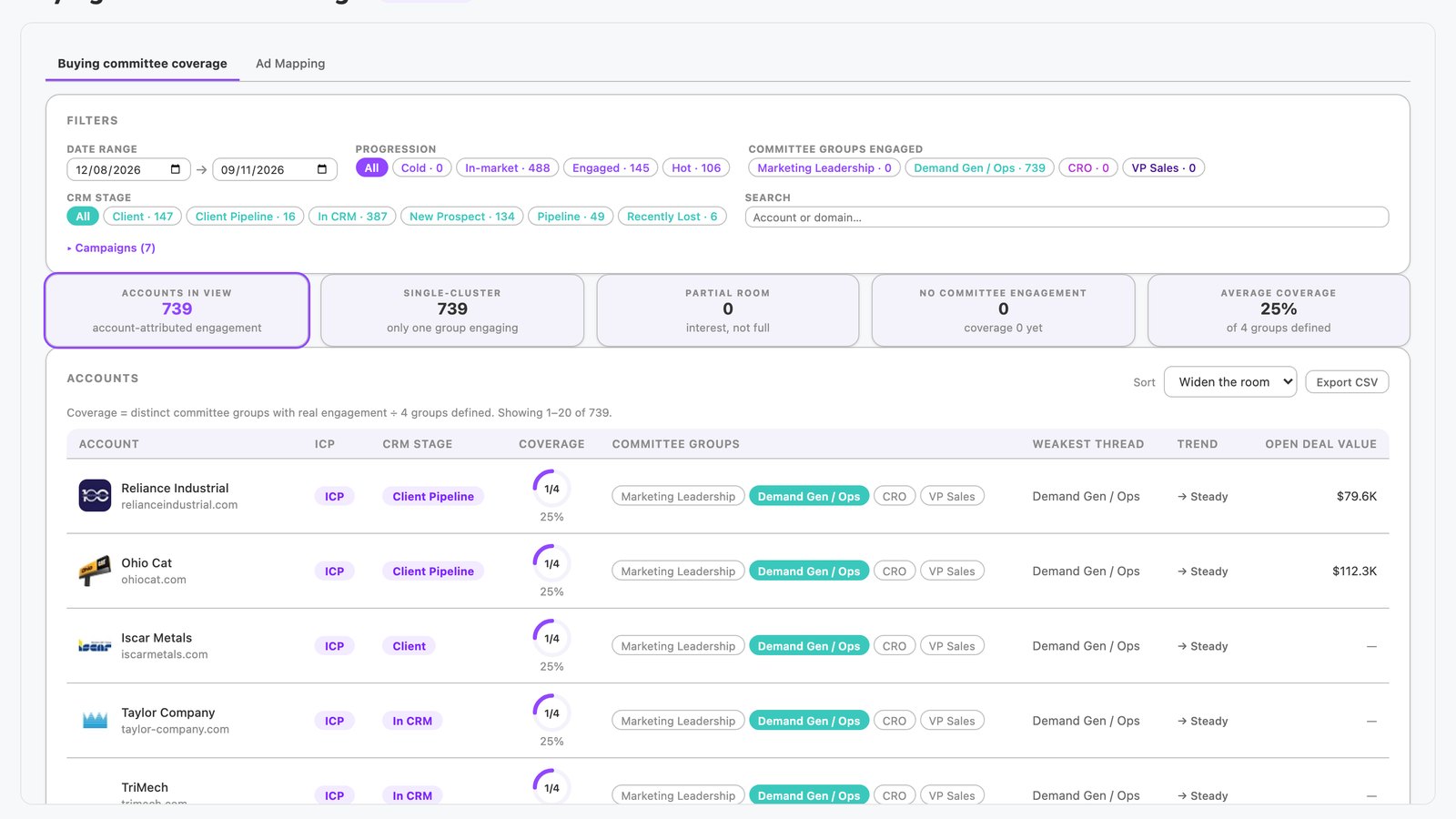
The buying committee coverage app is built in N.Rich AI and shows which buying committee groups each account engages with. It matches ad copy to four personas, then maps account engagement back to them. It shows where coverage gaps remain.
It opens free in the N.Rich AI playground on demo data. On your own N.Rich account, it reads accounts and deals from HubSpot or Salesforce.
- Coverage by ad creative Ad copy is matched to four buying committee personas, and account engagement maps back to them.
- Engagement trends Account-level engagement trends across the persona groups.
- An engagement timeline A timeline of engagement patterns by committee group.
- Built for
- Marketing, Sales
- Category
- Reporting
- Reads from
- N.Rich and your CRM (HubSpot or Salesforce)
- In the playground
- Buying Committee Coverage
- Cost
- Free on demo data. No credit card.
What questions does the buying committee coverage app answer?
What is buying committee coverage?
Buying committee coverage is how many of the roles on a company's buying committee your marketing has reached. A buying committee is the group of people at a company who help decide a purchase. A gap matters because a deal can stall when a key role never engages. The buying committee coverage app shows which committee groups each account engages with.
In the app: The whole appWhich ABM platform helps me reach the whole buying committee at target accounts?
Choose a platform that maps your ads to the roles on a buying committee and then shows which roles each account engages with. That view shows where your message has not landed. Without it, a campaign can keep reaching the same role. The buying committee coverage app classifies each ad's copy against four personas and maps account engagement back to those groups.
In the app: Ad mapping tab and coverage ringHow can I tell which buying groups are engaging with my ads at each account?
Tie each ad to the buying role its message speaks to, then track which accounts engage with those ads. The result shows which roles responded at each account. ABM teams use it to see where an account's attention sits. The buying committee coverage app shows a coverage ring for each account, and a tile counts accounts with no committee engagement.
In the app: Coverage ring and No committee engagement tileHow do I find accounts where only one buying group is engaged?
Compare each account's engaged roles with the full committee, then list the accounts where only one role responds. A single engaged role leaves the rest of the committee unreached. ABM teams use this list to decide where to widen the message. The buying committee coverage app filters by persona, and N.Rich AI can show only accounts that engage a single group.
In the app: Persona filterHow can I reach hidden buyers in a buying committee?
Write ads for the concerns of each role on the committee, then check which roles engage. A role that stays silent is the hidden part of the account. Adding messages for that role widens your reach inside the account. In the buying committee coverage app, a gap in an account's coverage ring points to a group your ads have not yet reached.
In the app: Coverage ringHow can I tell which buying group an ad speaks to?
Read the ad's copy and match its message to the role it addresses, such as marketing leadership or sales leadership. Then credit any account engagement with that ad to that role. A consistent mapping lets a team compare coverage across accounts. The buying committee coverage app classifies each ad's copy against four personas and shows the result in its Ad mapping tab.
In the app: Ad mapping tab
What data does the buying committee coverage app use?
From N.Rich
| Source | What the app reads | Where you see it |
|---|---|---|
| N.Rich advertising | Ad copy by campaign, and which accounts engaged with each ad | Ad mapping tab and the coverage ring |
| N.Rich intent | Intent level for each account | Intent filter |
From your CRM HubSpot or Salesforce
| Source | What the app reads | Where you see it |
|---|---|---|
| CRM accounts | CRM stage and context for each account | CRM stage filter and the account view |
| CRM deals | Deal value for each account | Account view |
In the playground, every source holds demo data.
How does it work?
- The app classifies each ad's copy against four buying committee personas: CMO, demand gen, CRO and VP sales.
- It maps real account engagement back to those groups.
- A coverage ring for each account shows which groups are engaged. A trend shows whether coverage is widening, steady or shrinking.
- You filter by progression stage, intent, campaign and persona. You then open an account to see its engagement timeline, CRM context and deal value.
Make it yours
Type a request and N.Rich AI rebuilds the app. Teams often start with one of these.
- Show only accounts that engage a single group
- Filter to hot accounts in one campaign
- Show accounts with no committee engagement
- Show only accounts where coverage is shrinking
Before you start
Is it free?
Yes. Every app runs free in the N.Rich AI playground on demo data. You do not need a credit card.
Do I need my own data?
No. The playground runs on a demo dataset, so you can try the app before you connect your own data.
Which CRMs does it work with?
On your own N.Rich account, apps read accounts and deals from HubSpot or Salesforce.
Can I change it?
Yes. Ask N.Rich AI to add a column, change a filter or focus on one segment, and it rebuilds the app.