What is the account prioritization app?
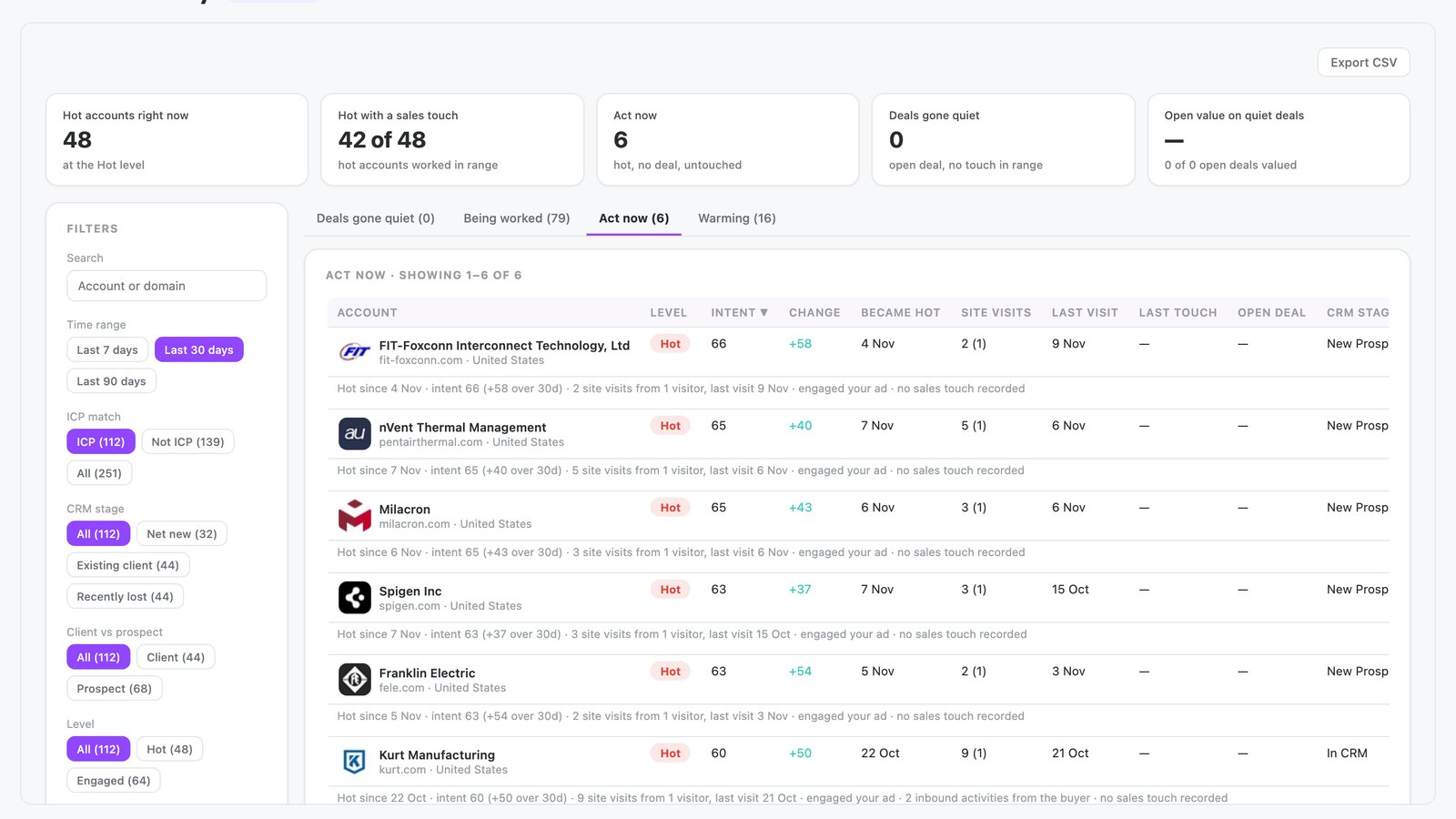
The account prioritization app is built in N.Rich AI and ranks accounts by intent and sales readiness. It builds a weekly worklist of hot accounts and stalled deals. Each row shows the exact signal behind it.
It opens free in the N.Rich AI playground on demo data. On your own N.Rich account, it reads accounts and deals from HubSpot or Salesforce.
- A ranked worklist Accounts ranked by intent level and sales readiness.
- Four lists Act now, being worked, deals gone quiet and warming.
- An account view Intent history, website visits, marketing engagement, sales activity and open opportunities.
- Built for
- Sales, Marketing
- Category
- Pipeline & revenue
- Reads from
- N.Rich and your CRM (HubSpot or Salesforce)
- In the playground
- Account Priority
- Cost
- Free on demo data. No credit card.
What questions does the account prioritization app answer?
What is account prioritization?
Account prioritization ranks target accounts by how much buying intent they show and how ready they are for a sales touch. It tells a team which accounts to work first. Without it, effort spreads across the whole list. The account prioritization app ranks accounts into a weekly worklist and shows the signal behind each row.
In the app: The whole appHow do I give sales a weekly list of accounts to contact?
Rank your target accounts each week by buying intent and by what sales has already done. Then give the top of that list to sales. A ranked list gives reps a clear next step each week. The account prioritization app builds that worklist and sorts accounts into quiet deals, being worked, act now and warming pipeline.
In the app: All four worklistsHow do I find hot accounts that have no deal and no sales touch yet?
Filter your accounts to those that are hot, have no open deal and have had no sales touch. These accounts show buying interest that nobody has followed up. For an ABM team, each one is a missed handoff until sales acts. The account prioritization app puts them in an act now list, so nobody misses them.
In the app: Act now listHow can I spot open deals that have gone quiet?
Look for open deals with no recent sales touch. A stalled deal still counts in the pipeline, so a missed follow-up puts real revenue at risk. A regular check keeps those deals in front of the team. The account prioritization app lists deals gone quiet with their open value, and a tile adds up that value.
In the app: Deals gone quiet list and Open value on quiet deals tileWhat should I look for in account prioritization software for ABM?
Look for software that ranks accounts on more than one signal and shows the evidence behind each rank. It should combine engagement with CRM data on deals and sales touches. Sales only acts on a list it understands. The account prioritization app scores accounts on a mix of first-party and third-party signals and shows the signal behind each row.
In the app: The whole appHow can I explain to sales why an account is ranked high?
Show the evidence behind each rank: the account's intent history, its website visits, the marketing it engaged with and the sales activity so far. A score earns trust when sales can check it. The account prioritization app opens each account to show this evidence plus open opportunities, and exports the full ranked list as a CSV file.
In the app: Account view
What data does the account prioritization app use?
From N.Rich
| Source | What the app reads | Where you see it |
|---|---|---|
| N.Rich intent | Intent level and intent history for each account, from first-party and third-party signals | The ranking, the hot level and the intent change |
| Website visits | Visits from each account to your site | Site visits and last visit columns |
| N.Rich advertising | Ad and content impressions that reached each account | "Engaged your ad" on each row |
From your CRM HubSpot or Salesforce
| Source | What the app reads | Where you see it |
|---|---|---|
| CRM accounts | ICP fit and CRM stage | ICP match and CRM stage filters |
| CRM deals | Open opportunities, deal stage and open deal value | Deals gone quiet list and open value tile |
| Sales activity | Sales touches logged against each account | Being worked and act now lists |
In the playground, every source holds demo data.
How does it work?
- The app scores each account on intent, using a mix of first-party and third-party signals.
- It sorts accounts into worklists by deal stage, sales touch history and trend. The worklists are quiet deals, being worked, act now and warming pipeline.
- You filter by ICP fit, CRM stage, intent level and time range. The time range can be 7, 30 or 90 days.
- You open any account to see its intent history, website visits, marketing engagement, sales activity and open opportunities. You can export the full list as a CSV.
Make it yours
Type a request and N.Rich AI rebuilds the app. Teams often start with one of these.
- Show only ICP accounts in the act now list
- Set the default time range to 30 days
- Sort the quiet deals by open value, highest first
- Export only the accounts with no sales touch
Before you start
Is it free?
Yes. Every app runs free in the N.Rich AI playground on demo data. You do not need a credit card.
Do I need my own data?
No. The playground runs on a demo dataset, so you can try the app before you connect your own data.
Which CRMs does it work with?
On your own N.Rich account, apps read accounts and deals from HubSpot or Salesforce.
Can I change it?
Yes. Ask N.Rich AI to add a column, change a filter or focus on one segment, and it rebuilds the app.