
What Are ICP-Based Workflows?
ICP-based workflows allow you to automatically identify, segment, and activate accounts that closely match your Ideal Customer Profile (ICP).
ICP-based workflows are automations that use Sales Velocity ICP data as a trigger to add, move, or remove accounts from N.Rich segments.
Sales Velocity ICP scores are calculated using your historical CRM opportunity data, helping identify which accounts are most similar to customers that convert quickly and successfully. When these scores are used in workflows, segmentation and targeting remain accurate and up to date without manual effort .
How to Create an ICP-Based Workflow
Before creating workflows, ensure Sales Velocity ICP is configured using your CRM opportunity data. This step defines how N.Rich evaluates ICP fit and buying velocity. Review our Sales Velocity ICP Configuration for details.
-
Navigate to the Workflow tab.
-
Click on + Create workflow.
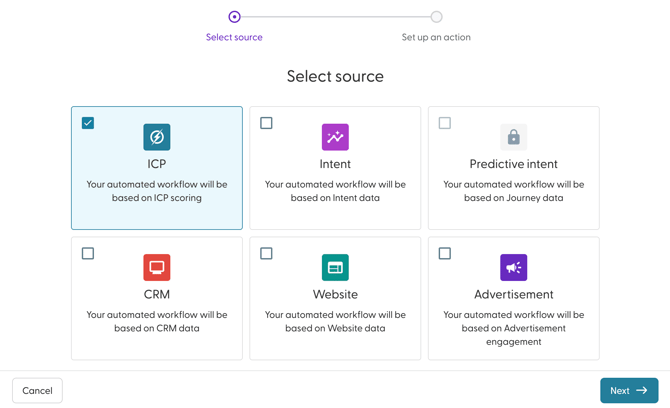
- Select ICP and click on Next.
- Enter a name for your Workflow. Best practice is to use a descriptive name that includes:
- The sales velocity score.
- The action being performed
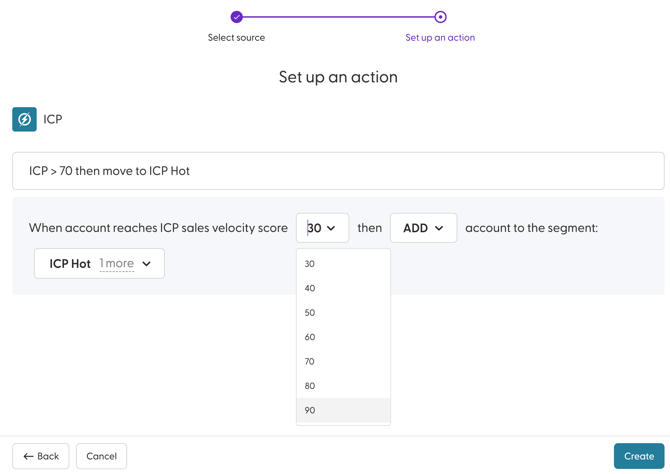
- Select the Sales Velocity Score that account must reach. You can select a score ranging from 30 to 90, available in increments of 10 (e.g., 30, 40, 50, etc.).
- Choose action that should be taken. You can choose to either add, move or remove.
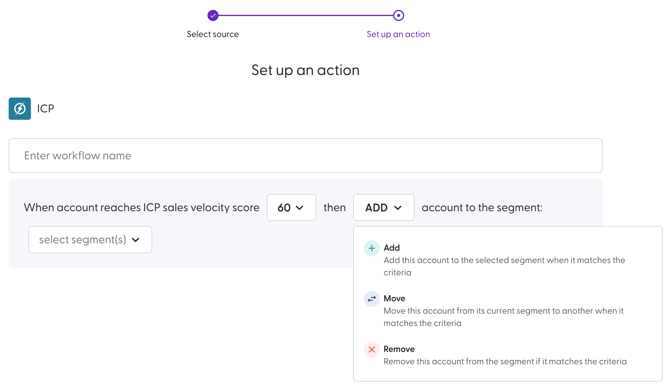
Here is a detailed description of what each action does:
Action Description Add The workflow adds an account that matches the trigger conditions to the destination segment(s). Move The workflow moves an account that matches the trigger conditions from the source segment(s) to the destination segment(s). Remove The workflow removes an account that matches the trigger conditions from the source
- Next, select the segment(s) that should be updated by the Workflow. There is no limit to the number of segments that you can choose here. You can also create a segment from this modal as well.
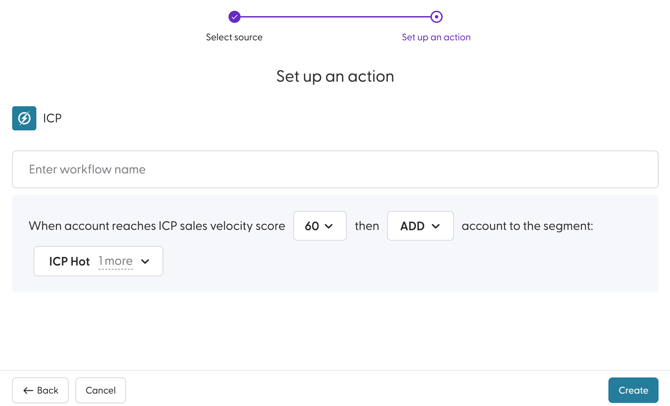
If you choose the action to move an accounts from one segment to another, you will be required to choose the segment(s) that they should be moved from and the segment(s) that they should be moved to.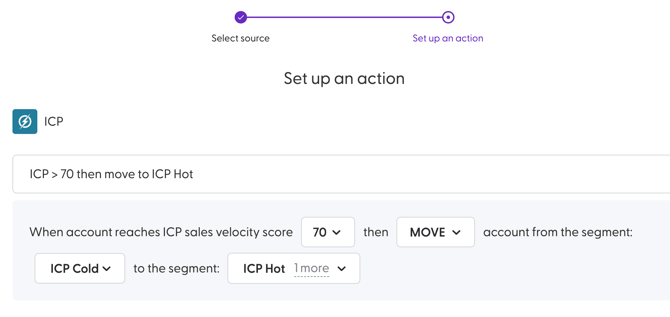
- Click Create to complete the creation process.
The Workflow will be active by default once created. Additionally, workflows are executed at least once per day. They can be executed multiple times per day, depending on the data source.
Use Case for ICP-Based Workflows
Prioritising High-ICP Accounts for Sales Outreach
This use case demonstrates how to use ICP-based workflows to automatically segment accounts based on their likelihood to convert and generate revenue. Revenue teams often need a consistent way to identify and prioritise accounts that fit their Ideal Customer Profile (ICP).
Goal:
-
Identify accounts that closely match your Ideal Customer Profile.
-
Prioritise high-potential accounts for sales outreach.
- Automatically keep ICP segments up to date as account data changes.
-
Align sales and marketing teams around a shared definition of ICP fit
Step 1: Segment Setup
Create the following segments to reflect ICP fit:
-
High ICP Accounts
-
Medium ICP Accounts
-
Low ICP Accounts
These segments will be populated and maintained automatically by workflows.
Step 2: Setup Workflows
a. High ICP Accounts Workflow
Trigger: When an account reaches a Sales Velocity score ≥ 70
Action:
-
Move account to the segment: High ICP Accounts
-
(Optionally remove the account from Medium and Low ICP segments if applicable)
c. Medium ICP Accounts Workflow
Trigger: When an account reaches a Sales Velocity score between 40 and 69
Action:
-
Move account to the segment: Medium ICP Accounts
-
(Optionally remove the account from High and Low ICP segments)
c. Low ICP Accounts Workflow
Trigger: When an account reaches a Sales Velocity score ≤ 39
Action:
-
Move account to the segment: Low ICP Accounts
-
(Optionally remove the account from High and Medium ICP segments)
Outcome
With these workflows in place:
-
High ICP Accounts always reflect accounts with the strongest revenue potential and should be prioritised for sales outreach.
-
Medium ICP Accounts represent accounts that may convert with additional nurturing.
-
Low ICP Accounts can be excluded from high-touch sales efforts, improving efficiency.
Because workflows move accounts between segments automatically, ICP classification stays accurate without manual updates.